#Building An AI Discord Chatbot?
Jump to part 2?
Building An AI Discord Chatbot? - With Tools
#0. Who's building a Discord chatbot in 2025?
Precisely because it's 2025! Look at what we've got:
- Large language models
- Convenient and mature Web techs
- A lot of tooling around LLMs (tool calls, MCPs)
You are just one frontend away from building your digital waifu own chatbot! However, supporting streaming server-sent events without everything exploding and maintaining accessibility anywhere is quite a frontend challenge.
What if I tell you, there is a way, without writing a single line of frontend code, you can get a perfect chat interface with cross-platform and mobile support? Yes! It's Discord!
#1. How to chat?
No, nobody is asking about chatting skills.
The first step to building a chatbot is to make a bot that can chat!
Previous chatbots are mostly rule-based, meaning they can only create simple replies based on intent guessing or vectorized searching. Now that we have LLMs, we can access APIs from major providers and enjoy a high-quality chatting experience.
#The brain
For example, OpenAI offers various API types:
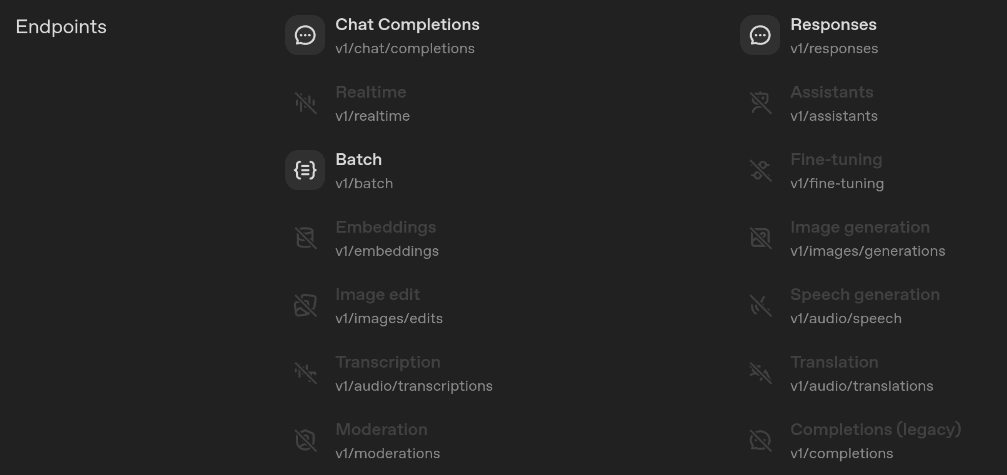
For text, there are mainly two options:
- Chat completions
- Stateless, you have to send over the whole chat history, including images and attachments, every time. Basically, all providers with OpenAI-compatible endpoints support this.
- Responses
- Newer API, can store previous chat histories, and better tool support. But currently limited mainly to OpenAI's models.
Considering we might want to swap out the underlying model for vibe testing, we would be using the chat completions API. Now we are done with API choosing, the next thing is to know how to interact with this API!
Following OpenAI's official document and sending a request over to the endpoint:
curl https://api.openai.com/v1/chat/completions \
  -H "Content-Type: application/json" \
  -H "Authorization: Bearer $OPENAI_API_KEY" \
  -d '{
    "model": "gpt-5",
    "messages": [
      {
        "role": "system",
        "content": "You are a helpful assistant."
      },
      {
        "role": "user",
        "content": "Hello!"
      }
    ]
  }'
We got back a response in a whole:
{
  "id": "chatcmpl-B9MBs8CjcvOU2jLn4n570S5qMJKcT",
  "object": "chat.completion",
  "created": 1741569952,
  "model": "gpt-5",
  "choices": [
    {
      "index": 0,
      "message": {
        "role": "assistant",
        "content": "Hello! How can I assist you today?"
        // other fields
      },
      "finish_reason": "stop"
    }
  ]
  // other fields
}
But this poses a problem: some larger models take dozens of seconds or several minutes to generate the full response. If we wait until the API returns the entire response and then forward it to the users, the UX would be very poor.
It's like those people who read your message and take them 10 minutes before sending you back a several-page-long response, not very ideal.
Luckily, the completion API has a flag we can set: stream: true. With this, the response becomes a stream with small chunks:
{"id":"chatcmpl-123","object":"chat.completion.chunk","created":1694268190,"model":"gpt-4o-mini", "system_fingerprint": "fp_44709d6fcb", "choices":[{"index":0,"delta":{"role":"assistant","content":""},"logprobs":null,"finish_reason":null}]}

{"id":"chatcmpl-123","object":"chat.completion.chunk","created":1694268190,"model":"gpt-4o-mini", "system_fingerprint": "fp_44709d6fcb", "choices":[{"index":0,"delta":{"content":"Hello"},"logprobs":null,"finish_reason":null}]}

....

{"id":"chatcmpl-123","object":"chat.completion.chunk","created":1694268190,"model":"gpt-4o-mini", "system_fingerprint": "fp_44709d6fcb", "choices":[{"index":0,"delta":{},"logprobs":null,"finish_reason":"stop"}]}
The user would see text appear one after another, like receiving a response immediately, which is a lot better for UX.
But this streaming method is a bit more difficult for developers. Without streaming, you send one request and receive one response, just as you usually do, simple!
With streaming? Since we are receiving responses bit by bit, we need to maintain a local buffer and push newly received chunks into it. Simultaneously, we also need to forward the new chunk to the user. So handling streaming requires more code.
#The nerves
To write less code have a simpler experience wiring up LLM APIs and Discord, we can use the AI SDK from Vercel.
AI SDK
Basic usage:
import { generateText } from "ai";
import { createOpenAI } from "@ai-sdk/openai";

const provider = createOpenAI({
  baseURL: "https://api.openai.com/v1",
  apiKey: "<API_KEY>",
});

const { text } = await generateText({
  model: provider('gpt-5'),
  prompt: "What is love?",
});

console.log(text);
But we are using stream, so, a bit more code:
import { streamText, type ModelMessage } from "ai";
import { createOpenAI } from "@ai-sdk/openai";

const provider = createOpenAI({
  baseURL: "https://api.openai.com/v1",
  apiKey: "<API_KEY>",
});

// we need to push new messages into this array, so the chat history is preserved
const messages: ModelMessage[] = [
  { role: "system", content: "You are a helpful assistant." },
  { role: "user", content: "What is love?" },
];

const { textStream, response } = streamText({
  model: provider('gpt-5'),
  messages,
});

let buffer = "";
for await (const chunk of textStream) {
  buffer += chunk;
  // we need to forward this new chunk to the user, creating an illusion of constant replying
}

// full response from the model
console.log(buffer);

// add all messages created in this current round into the message array
const { messages: responseMessages } = await response;
messages.push(...responseMessages);
The last line is the most important one; you need to ensure the model has all the necessary context to create a correct and high-quality response!
More on
response.messagesAI SDK nicely provides a
messagesfield in theresponseobject, which holds all the messages created by the model in this current request.
responseMessagesis an array, and this is why we are usingpush(...)here. This array can contain model responses and tool call results. You can distinguish them by therolefield:ts[ { role: "assistant", content: [{ type: "tool-call", toolName: "fetch" }] }, { role: "tool", content: [{ type: "tool-result", toolName: "fetch", output: {} }] }, { role: "assistant", content: [{ type: "text", text: "The page you requested is ..." }] }, ]
Multiple models
The examples above all use the gpt-5 model; however, gpt-5 is not actually suitable for chatting. It's stubborn and prolonged. But it's fine, we can swap it out!
import { createOpenAI } from "@ai-sdk/openai";
const provider = createOpenAI({ baseURL: "https://api.openai.com/v1", apiKey: "<API_KEY>" });
const model = provider('gpt-5-chat-latest');

// Use Grok
import { createXai } from "@ai-sdk/xai";
const provider = createXai({ apiKey: "<API_KEY>" });
const model = provider('grok-4-fast-non-reasoning');

// Use Openrouter
import { createOpenRouter } from "@openrouter/ai-sdk-provider";
const provider = createOpenRouter({ apiKey: "<API_KEY>" });
const model = provider('openai/gpt-5-chat');
const model = provider('anthropic/claude-sonnet-4');
const model = provider('google/gemini-2.5-pro');

// Any OpenAI-compatible providers
import { createOpenAICompatible } from "@ai-sdk/openai-compatible";
const provider = createOpenRouter({ name: "ollama", baseURL: "http://localhost:11434/v1" });
const model = provider('llama4');
This is one of the multiple strengths of the AI SDK: we can easily swap out the underlying model. We don't need to touch any part of the streaming logic we just created.
#2. How to Discord?
I actually think this is the hardest part. We need to trigger the bot whenever someone tags the bot with @bot, craft the payload, send it to the API, and stream back the response to Discord under the user's post.
#Creating a bot
Let's start simple: creating a bot account.
-
Go to Discord Developers and create a new application.
-
After that, go to the left sidebar and create a bot under the bot section.
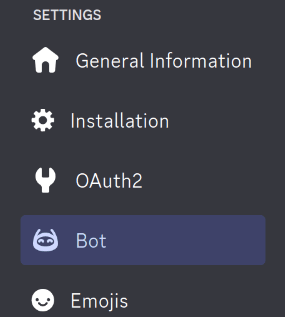
Remember to enable "Message content intent"; otherwise, the bot would not be able to receive messages.

-
Then, we can go to the "Installation" page and invite the bot to a server. (It's normal if the bot is offline, since we haven't told Discord our bot is alive!)
#Online the bot
We would be using discord.js to handle Discord-related operations. First, we need to connect to Discord:
import { Client, GatewayIntentBits, Partials } from "discord.js";

const client = new Client({
  intents: [
    GatewayIntentBits.Guilds,
    GatewayIntentBits.GuildMessages,
    GatewayIntentBits.GuildMessageReactions,
    GatewayIntentBits.DirectMessages, // if you are allowing DMs
    GatewayIntentBits.MessageContent,
  ],
  partials: [Partials.Channel],
});
Then, we can set the bot to online:
client.user?.setPresence({
  status: "online",
  // you can customize the activity description, the message has a limit of 128 characters
  activities: [{ type: ActivityType.Custom, name: "New bot online!" }],
});
Discord also supports various other features, but for a simple chatbot, we would only be using this much.
#Receiving messages
Time to get some messages in! First, we need to register an event listener on the messageCreate event:
client.on("messageCreate", (msg) => console.log(msg));With this, we would receive every message sent to every channel (and DM) on all the servers the bot is in. Which is not ideal, since not all of them are useful to our bot. We only want messages that @bot or replies directly to our bot's messages.
import { Message, ChannelType } from "discord.js";

function handleMessageCreate(msg: Message) {
  // Skip the message if it's from a bot, unless you want your bot to be able to reply to other bots, leave this in.
  // Removing this could cause infinite loops between bot replies, which can lead to you getting bankrupt!!!
  if (msg.author.bot) return;

  // Check if the current message contains @bot
  // `mentions` works on the whole thread, it's like you being tagged in a thread, same logic
  const isDM = msg.channel.type === ChannelType.DM;
  if (!isDM && !msg.mentions.users.has(client.user!.id)) return;

  // If a message reaches here, it's probably what we are looking for!
}
Tip: If you want the whole conversion thread, you need to grab them one by one.
- If you just want
id:msg.reference?.messageIdgets you theidto whichmsgis replying to. If it returnsnull, there's no parent message.- If you want the whole parent message object:
await msg.fetchReference().catch(() => null)
#Reply to messages
Before wiring up the AI brain, we need to know how to send back messages to Discord.
The limit for a single message on Discord is 4096, remember to check your length!
function handleMessageCreate(msg: Message) {
  // above code
  const reply = await msg.reply({
    content: "Reply from the bot!!",
    allowedMentions: { parse: [], repliedUser: false },
  });
}
This way, any @bot message will receive a reply!
If you want to make the response more interesting, you can use the
EmbedBuilderto add some style.tsimport { Colors } from "discord.js"; function handleMessageCreate(msg: Message) { // above code const emb = new EmbedBuilder(); emb.setDescription("Hello! This is an embed message!"); emb.setColor(Colors.Gold); const reply = await msg.reply({ embeds: [emb], allowedMentions: { parse: [], repliedUser: false }, }); }
Because our AI response is coming in chunks, we can utilize the "edit" method to add new content into the reply.
let buffer = "Hello! ";

const emb = new EmbedBuilder();
emb.setDescription(buffer);

const reply = await msg.reply({
  embeds: [emb],
  allowedMentions: { parse: [], repliedUser: false },
});

buffer += "This is an embed message!";
emb.setDescription(buffer);

// Edit!
await reply.edit({ embeds: [emb] });#Wire up the brain!!
We can finally put the brain in!
For multimodal LLMs, images and attachments are valid inputs. But it is more difficult to handle these additional parts, so I am only showing simple text messages here.
First, we need a helper function to convert Discord messages into model messages for LLM APIs:
private async messageToModelMessages(msg: Message) {
  try {
    // the main message
    const content = msg.content || "";
    // (optional) if have embedding messages
    const embedsText = msg.embeds
      .map((e) =>
        [e.title, e.description, e.footer?.text].filter(Boolean).join("\n"),
      )
      .filter((s) => s && s.length > 0) as string[];

    // (optional) if have component messages
    const componentsText: string[] = [];
    for (const row of msg.components || []) {
      if (row.type === ComponentType.ActionRow) {
        for (const comp of row.components || []) {
          if ("label" in comp && typeof comp.label === "string") {
            componentsText.push(comp.label);
          }
        }
      }
    }

    const combinedText = [content, ...embedsText, ...componentsText]
      .filter(Boolean)
      .join("\n");

    const role =
      msg.author.id === this.client.user?.id ? "assistant" : "user";

    const contentArray = [
      { type: "text", text: combinedText },
    ];

    const parent = await msg.fetchReference().catch(() => null);

    if (role === "user") {
      // (optional) you can add user name (id) into the chat to let the model know who is who
      const userId = msg.author.id;
      for (const c of contentArray || []) {
        if (c.type !== "text") continue;
        c.text = `[name=${String(userId)}]: ${c.text}`;
      }

      return {
        parent,
        message: {
          role,
          content: contentArray,
        } satisfies ModelMessage,
      };
    } else {
      return {
        parent,
        message: {
          role,
          content: contentArray as string | TextPart[],
        } satisfies ModelMessage,
      };
    }
  } catch (e) {
    console.error(e);
  }
  return { parent: null };
}
Then, we need to handle the full chain of events: receive message -> convert to model messages -> send to the model -> stream response to Discord
- Because we are grabbing messages from new to old on Discord, the created
messagesarray is also new to old. Remember to reverse that when handing that to the model API.- If we are only dealing with plain text, all the information is already in Discord chat, so we don't need to hold a copy of the
messagesarray. If we are adding image support or tool calls, we need to store this data.
const provider = createOpenAI({
  baseURL: "https://api.openai.com/v1",
  apiKey: "<API_KEY>",
});

function handleMessageCreate(msg: Message) {
  if (msg.author.bot) return;
  const isDM = msg.channel.type === ChannelType.DM;
  if (!isDM && !msg.mentions.users.has(client.user!.id)) return;

  // limit the message count sending to the model, save you from getting bankrupt
  const maxMessages = 25;
  let currMsg: Message | null = msg;
  const messages: ModelMessage[] = []; // new -> old
  while (currMsg && messages.length < maxMessages) {
    const { parent, message } = await this.messageToModelMessages(currMsg);
    if (message) messages.push(message);
    currMsg = parent;
  }

  // add system prompt to tell the model what it should do
  messages.push({
    role: "system",
    content: "You are a helpful assistant.\nUser's names are their Discord IDs and should be typed as '<@ID>'.",
  });

  // tell Discord we are typing
  if ("sendTyping" in msg.channel) await msg.channel.sendTyping();

  const { textStream, finishReason } = streamText({
    model: provider('gpt-5-chat-latest'),
    messages: messages.reverse(),
  });

  let lastSentAt = 0;
  let buffer = "";
  const reply = await msg.reply({
    embeds: [new EmbedBuilder()],
    allowedMentions: { parse: [], repliedUser: false },
  });
  for await (const chunk of textStream) {
    buffer += chunk;

    // update at most once per second to avoid hitting rate limit
    const now = Date.now();
    if (now - lastSentAt < 1000) continue;
    lastSentAt = now;

    const emb = new EmbedBuilder();
    emb.setDescription(buffer + " ⚪");
    reply.edit({ embeds: [emb] });
  }

  // ensure the final content is correct
  const emb = new EmbedBuilder();
  emb.setDescription(buffer);
  reply.edit({ embeds: [emb] });

  // for debugging, should prints `stop` if successful
  console.log(await finishReason);
}#3. The end?
Of course not! We haven't even touched on tools and MCPs.
However, this article is becoming too lengthy, so we'll continue with the integration of tools into this chatbot (including tool support in models that don't natively support tool calls) in the next article. That would enable the model to be more useful than just chatting.
Continue to part 2, adding tools!
Building An AI Discord Chatbot? - With Tools